# Bind\_shell RAT Analysis

## Sample Information

***

Malware used- RAT.Unknown.exe.malz&#x20;

Type - Remote Access Trojan

## Static Analysis

***

#### Floss-

command used-

```
	floss.exe .\RAT.Unknown.exe.malz > RAT_floss.txt
```

<figure><img src="https://2429440930-files.gitbook.io/~/files/v0/b/gitbook-x-prod.appspot.com/o/spaces%2Fvmiq90eCUf7ZZMUGm7Qu%2Fuploads%2FLCvIcpjS4HZMtSLpBhTg%2Fimage.png?alt=media&#x26;token=fba53e6d-e5cc-4e2c-8233-69850d2087a9" alt=""><figcaption></figcaption></figure>

<figure><img src="https://2429440930-files.gitbook.io/~/files/v0/b/gitbook-x-prod.appspot.com/o/spaces%2Fvmiq90eCUf7ZZMUGm7Qu%2Fuploads%2F4UiAvxCgyhCQB06XWbKJ%2Fimage.png?alt=media&#x26;token=53ab8851-bcbb-4568-a020-59510b04b33d" alt=""><figcaption></figcaption></figure>

## Initial Detonation

***

<figure><img src="https://2429440930-files.gitbook.io/~/files/v0/b/gitbook-x-prod.appspot.com/o/spaces%2Fvmiq90eCUf7ZZMUGm7Qu%2Fuploads%2F8FR72rCT4TQ6FtK0vqwJ%2Fimage.png?alt=media&#x26;token=724d89ed-6337-4540-9fc7-aba63eb7278c" alt=""><figcaption></figcaption></figure>

The malware detects the sandbox and stops running giving out an error.

## Dynamic Analysis

***

#### Network Analysis-

<figure><img src="https://2429440930-files.gitbook.io/~/files/v0/b/gitbook-x-prod.appspot.com/o/spaces%2Fvmiq90eCUf7ZZMUGm7Qu%2Fuploads%2FlWF0X5Dof0DaB4JaoTpq%2Fimage.png?alt=media&#x26;token=5ea7e97d-930e-4155-baaf-6aedd44056c6" alt=""><figcaption></figcaption></figure>

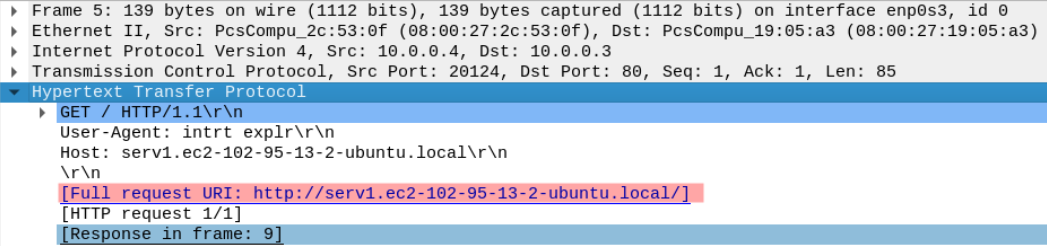
We see a bunch of http requests made by the malicious exe file. Navigating to the topmost request we get,

<figure><img src="https://2429440930-files.gitbook.io/~/files/v0/b/gitbook-x-prod.appspot.com/o/spaces%2Fvmiq90eCUf7ZZMUGm7Qu%2Fuploads%2FWiqEqtna29mefWiGuiHt%2Fimage.png?alt=media&#x26;token=3e3fdb0b-87cb-4eb6-a3dc-e9cd3d789ad0" alt=""><figcaption></figcaption></figure>

The malware is requesting for this web URI.<br>

<figure><img src="https://2429440930-files.gitbook.io/~/files/v0/b/gitbook-x-prod.appspot.com/o/spaces%2Fvmiq90eCUf7ZZMUGm7Qu%2Fuploads%2FrGF3v3pyZRTzqsyIEWJR%2Fimage.png?alt=media&#x26;token=76adc0c6-043b-4f2e-8543-662e7e740218" alt=""><figcaption></figcaption></figure>

Then the server responds with an executable namely - msdcorelib.exe.\
Now following that http-stream, we get-

<figure><img src="https://2429440930-files.gitbook.io/~/files/v0/b/gitbook-x-prod.appspot.com/o/spaces%2Fvmiq90eCUf7ZZMUGm7Qu%2Fuploads%2FhPO66969TpsVE5vIqJit%2Fimage.png?alt=media&#x26;token=12df4f5c-8278-4d6f-8ed4-5a20d46beae5" alt=""><figcaption></figcaption></figure>

<figure><img src="https://2429440930-files.gitbook.io/~/files/v0/b/gitbook-x-prod.appspot.com/o/spaces%2Fvmiq90eCUf7ZZMUGm7Qu%2Fuploads%2FzKUn4cSp8ukSSxfzFYeu%2Fimage.png?alt=media&#x26;token=1fdaed15-27b5-4dc4-ada7-2fef47ccd05b" alt=""><figcaption></figcaption></figure>

Inetsim responded to the request with a default executable.

{% hint style="info" %}
The binary may not be stored on the system under the same name it is requested. This process is commonly used by red-teamers and malware developers and is known as Decoupling.
{% endhint %}

### Host signature Analysis-

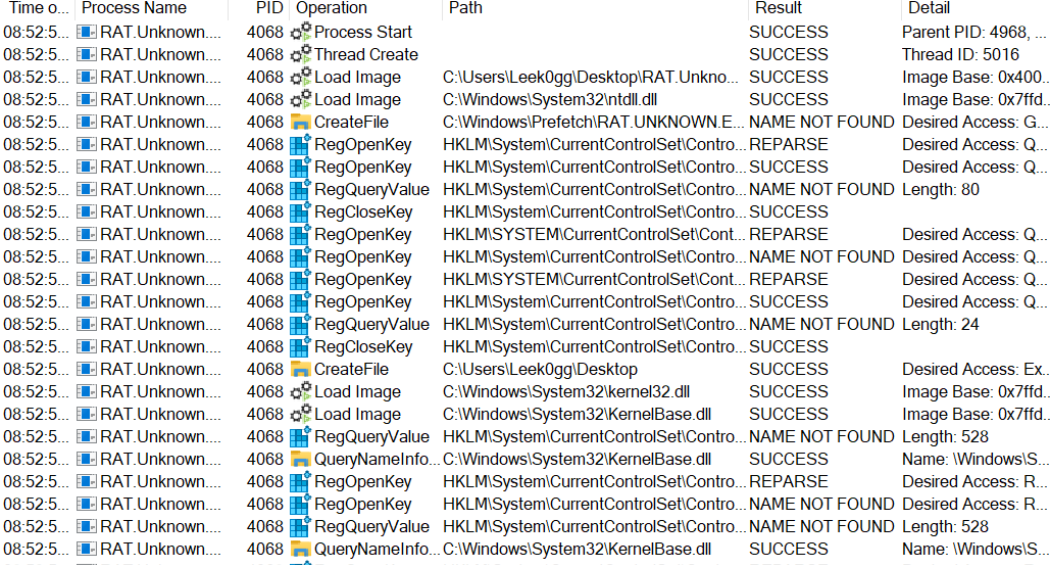
Adding a filter in procmon for the malware executable name-<br>

<figure><img src="https://2429440930-files.gitbook.io/~/files/v0/b/gitbook-x-prod.appspot.com/o/spaces%2Fvmiq90eCUf7ZZMUGm7Qu%2Fuploads%2FStA0SQ4xYnJhUBtynzbJ%2Fimage.png?alt=media&#x26;token=c6c1ff36-a1b8-4bfe-9aea-8b4b4a90c3a7" alt=""><figcaption></figcaption></figure>

Then run the exe.<br>

<figure><img src="https://2429440930-files.gitbook.io/~/files/v0/b/gitbook-x-prod.appspot.com/o/spaces%2Fvmiq90eCUf7ZZMUGm7Qu%2Fuploads%2Fr3Tikl9AhWPLVtctiumt%2Fimage.png?alt=media&#x26;token=d0cfbd5b-1d01-4333-aec6-66bca10445fe" alt=""><figcaption></figcaption></figure>

We get a load of processes.Now to track down the downloaded executable,we add another filter to only show file processes.<br>

<figure><img src="https://2429440930-files.gitbook.io/~/files/v0/b/gitbook-x-prod.appspot.com/o/spaces%2Fvmiq90eCUf7ZZMUGm7Qu%2Fuploads%2FbR8k1EWvd95DV81vpqmf%2Fimage.png?alt=media&#x26;token=76eb9250-f7dc-457b-8303-4be1f8d0d84c" alt=""><figcaption></figcaption></figure>

There's a lot of information. Now we had a file location in strings output.<br>

<figure><img src="https://2429440930-files.gitbook.io/~/files/v0/b/gitbook-x-prod.appspot.com/o/spaces%2Fvmiq90eCUf7ZZMUGm7Qu%2Fuploads%2FcvnmiuycTzzMwh1NV05k%2Fimage.png?alt=media&#x26;token=8c3b8d63-1066-4718-82a8-0eea8f271cea" alt=""><figcaption></figcaption></figure>

Adding a filter with that location-<br>

<figure><img src="https://2429440930-files.gitbook.io/~/files/v0/b/gitbook-x-prod.appspot.com/o/spaces%2Fvmiq90eCUf7ZZMUGm7Qu%2Fuploads%2FMqWTldeQoMpp8YqfkaEy%2Fimage.png?alt=media&#x26;token=899dfbfc-9948-4ea8-a569-e72fc743f4ab" alt=""><figcaption></figcaption></figure>

We get some results.<br>

<figure><img src="https://2429440930-files.gitbook.io/~/files/v0/b/gitbook-x-prod.appspot.com/o/spaces%2Fvmiq90eCUf7ZZMUGm7Qu%2Fuploads%2FQyQ1ggO94mDz2OKNPuRH%2Fimage.png?alt=media&#x26;token=cae6612a-2e82-46bd-a985-cdadb94d3096" alt=""><figcaption></figcaption></figure>

The downloaded executable is saved as mscordll.exe.<br>

<figure><img src="https://2429440930-files.gitbook.io/~/files/v0/b/gitbook-x-prod.appspot.com/o/spaces%2Fvmiq90eCUf7ZZMUGm7Qu%2Fuploads%2FlW34p2SL4gZNgE9MjLQM%2Fimage.png?alt=media&#x26;token=56acc0f2-28bd-4765-aded-de76c7ab01fa" alt=""><figcaption></figcaption></figure>

This "suspicious" executable has been created in the startup folder. Thus whenever the system starts,the executable is also run.<br>

<figure><img src="https://2429440930-files.gitbook.io/~/files/v0/b/gitbook-x-prod.appspot.com/o/spaces%2Fvmiq90eCUf7ZZMUGm7Qu%2Fuploads%2F3BnLJEM8C3RBodImmcFg%2Fimage.png?alt=media&#x26;token=9d720128-c082-4a05-acf8-02bdf27a571f" alt=""><figcaption></figcaption></figure>

### Another set of signatures-

#### Internal network signatures on the host

In order to analyse the connections made by the malware internally, TCPview is used. It is a part of the sysinternals suite.<br>

<figure><img src="https://2429440930-files.gitbook.io/~/files/v0/b/gitbook-x-prod.appspot.com/o/spaces%2Fvmiq90eCUf7ZZMUGm7Qu%2Fuploads%2FUuZhO51zC3wbcLVLQm2H%2Fimage.png?alt=media&#x26;token=ebc719fb-b8c7-47a2-9fe4-34421f4888e2" alt=""><figcaption></figcaption></figure>

We need to look out for TCP artifacts such as open sockets or tcp connections.<br>

<figure><img src="https://2429440930-files.gitbook.io/~/files/v0/b/gitbook-x-prod.appspot.com/o/spaces%2Fvmiq90eCUf7ZZMUGm7Qu%2Fuploads%2FW1etnrM2dFFPOLYo76cs%2Fimage.png?alt=media&#x26;token=2c16bb6e-9885-4718-ad89-811511a7347b" alt=""><figcaption></figcaption></figure>

We see that the malware has opened up a listening port on TCP : 5555.\
Thus we use netcat to connect to the port using the command-

```
	nc -nv 10.0.0.4 5555
```

<figure><img src="https://2429440930-files.gitbook.io/~/files/v0/b/gitbook-x-prod.appspot.com/o/spaces%2Fvmiq90eCUf7ZZMUGm7Qu%2Fuploads%2FqUvxLU949VhAazO8Mcpv%2Fimage.png?alt=media&#x26;token=5b89efdd-346a-421c-bf94-d88bd1ee4514" alt=""><figcaption></figcaption></figure>

We get a base64 encoded response.Decoding it we get-

<figure><img src="https://2429440930-files.gitbook.io/~/files/v0/b/gitbook-x-prod.appspot.com/o/spaces%2Fvmiq90eCUf7ZZMUGm7Qu%2Fuploads%2F0PCmSYF7w6a7FxxnI4Vz%2Fimage.png?alt=media&#x26;token=6290ab26-dcde-48d9-951c-f3c05376aa30" alt=""><figcaption></figcaption></figure>

So the malware is waiting upon an attacker to run a command.

So Command injection capability using bind shells is confirmed.