# Basic Dynamic Analysis

## Introduction

***

Basic Dynamic Analysis is the method of examining a malware while running. It is also known as Heuristic or Behaviourial analysis. It is a limited form of triage. It tells us a lot about the host and network indicators.<br>

## Host And Network Based Indicators

***

Host based Indicators are the actions the malware takes while modifying or interacting with the host. They can be pulled from the host based logs.

Example- Creating a file,modifying a service,etc.

Network based indicators are the action the malware takes when interacting with the network or the internet. They can be pulled from network logs.

Example- Downloading a second stage,uploading data,etc.<br>

## Hunting for network signatures

***

#### NOTE-

Before initial detonation, be sure to KEEP ALL REQUIRED TOOLS UP AND RUNNING . If the malware detects itself in a sandbox,it may try to sabotage the analysis which is detrimental to the triage.

#### Simulating a network-

Fire up Remnux vm which is in networked in the same network as the flarevm box.

Then start Inetsim on REMnux using the following command-

```
	inetsim
```

<figure><img src="https://2429440930-files.gitbook.io/~/files/v0/b/gitbook-x-prod.appspot.com/o/spaces%2Fvmiq90eCUf7ZZMUGm7Qu%2Fuploads%2FbCe4hajvivp32urfck5j%2Fimage.png?alt=media&#x26;token=6869c54f-0800-4708-bc6e-a8ebd44841c5" alt=""><figcaption></figcaption></figure>

Confirm that intsim is up and running.

<figure><img src="https://2429440930-files.gitbook.io/~/files/v0/b/gitbook-x-prod.appspot.com/o/spaces%2Fvmiq90eCUf7ZZMUGm7Qu%2Fuploads%2FsPzrDa8dHCnUSECrNUwn%2Fimage.png?alt=media&#x26;token=84b52cec-4656-4b2f-9564-8715816bfa9b" alt=""><figcaption></figcaption></figure>

It is up and running.Now to capture network traffic generated by the malware,we need to setup wireshark on the REMnux box. Start it by typing-

```
	sudo wireshark
```

<figure><img src="https://2429440930-files.gitbook.io/~/files/v0/b/gitbook-x-prod.appspot.com/o/spaces%2Fvmiq90eCUf7ZZMUGm7Qu%2Fuploads%2FxzOsjEUTUw3BA4Sw1bX6%2Fimage.png?alt=media&#x26;token=ccca9688-a0d3-4fdd-8971-e808ab6305ee" alt=""><figcaption></figcaption></figure>

Now click on the desired network interface to capture traffic.In my case it is enp0s3. Here traffic will be seen. For more information on display filters,see - <https://wiki.wireshark.org/DisplayFilters\\>
Now we can move on to analysis of the malware.

#### Detonation-

Change the file extension to .exe to make it a portable executable file.\
After detonation , we capture a request in wireshark.

<figure><img src="https://2429440930-files.gitbook.io/~/files/v0/b/gitbook-x-prod.appspot.com/o/spaces%2Fvmiq90eCUf7ZZMUGm7Qu%2Fuploads%2F10oO5QC5ymGFdLxhKdbI%2Fimage.png?alt=media&#x26;token=c1a68b9c-f621-44f7-96b3-3d270abb75e6" alt=""><figcaption><p>The network signature of the malware.</p></figcaption></figure>

## Hunting for host based signatures

***

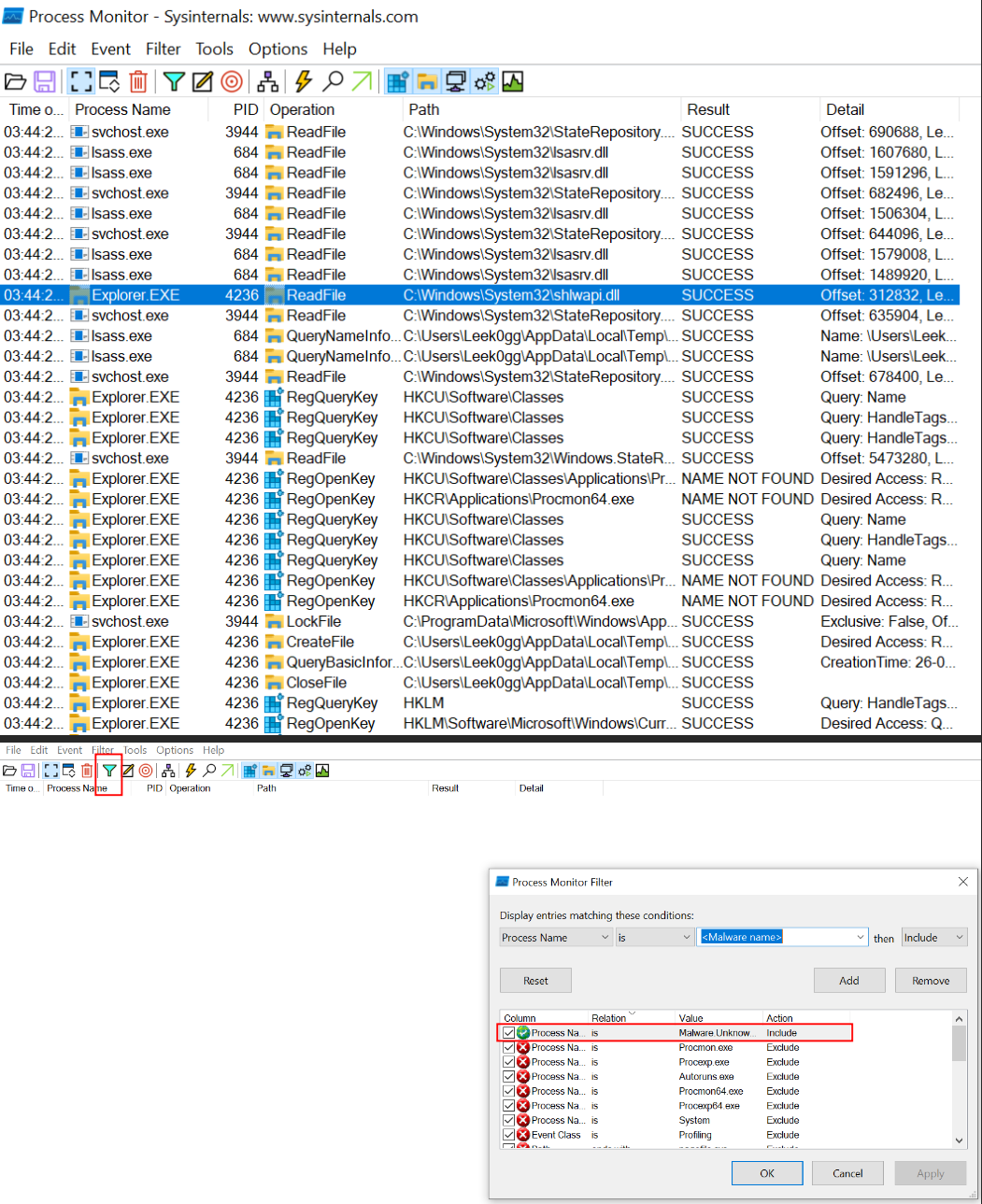
Procmon will be used to analyse host based signatures of the malware. The sysinternals utility set will be used heavily in signature detection of malwares.

<figure><img src="https://2429440930-files.gitbook.io/~/files/v0/b/gitbook-x-prod.appspot.com/o/spaces%2Fvmiq90eCUf7ZZMUGm7Qu%2Fuploads%2FF3b50JFtw0dY9zp6YGwV%2Fimage.png?alt=media&#x26;token=9865d23d-cdcc-46d9-97b7-303e2ba5c57c" alt=""><figcaption><p>Applying filter for malware executable</p></figcaption></figure>

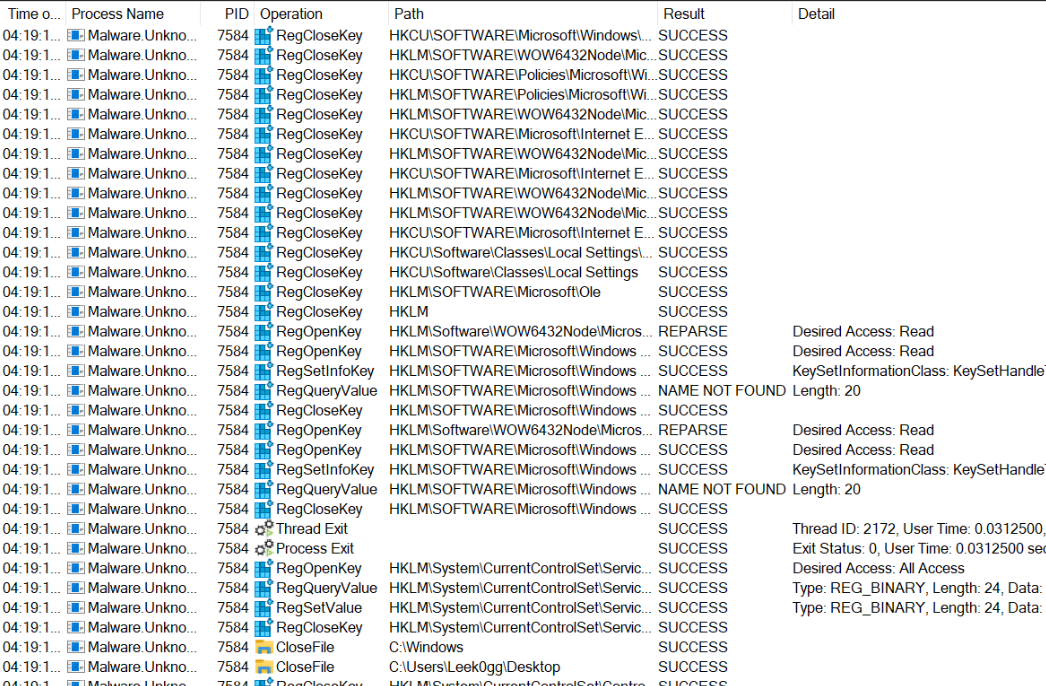
After detonation,we get a list of what the malware has done chronological wise.

<figure><img src="https://2429440930-files.gitbook.io/~/files/v0/b/gitbook-x-prod.appspot.com/o/spaces%2Fvmiq90eCUf7ZZMUGm7Qu%2Fuploads%2F8uNWlVPnMH2siZtBe5iN%2Fimage.png?alt=media&#x26;token=36e1c8c9-cda5-4292-99c2-0b5e09e25579" alt=""><figcaption></figcaption></figure>

Add a filter to monitor file changes-

<figure><img src="https://2429440930-files.gitbook.io/~/files/v0/b/gitbook-x-prod.appspot.com/o/spaces%2Fvmiq90eCUf7ZZMUGm7Qu%2Fuploads%2FjV6bvt3HIfSzVdBiwsL9%2Fimage.png?alt=media&#x26;token=9c53a717-fecd-462c-a8c0-8fcc39a138d1" alt=""><figcaption></figcaption></figure>

We find all kinds of interesting changes done by the malware.For example, we see that the malware has created an executable named dat.exe .<br>

<figure><img src="https://2429440930-files.gitbook.io/~/files/v0/b/gitbook-x-prod.appspot.com/o/spaces%2Fvmiq90eCUf7ZZMUGm7Qu%2Fuploads%2FLal4T0dmtY7uoGZeUOHY%2Fimage.png?alt=media&#x26;token=4f190690-d0ad-49a3-b9fb-91b8ce34c1de" alt=""><figcaption></figcaption></figure>

Opening the file location :-<br>

<figure><img src="https://2429440930-files.gitbook.io/~/files/v0/b/gitbook-x-prod.appspot.com/o/spaces%2Fvmiq90eCUf7ZZMUGm7Qu%2Fuploads%2FOWd4RkGhRfI59gMNdbnJ%2Fimage.png?alt=media&#x26;token=0fb0cab2-69c6-4588-8126-c374c57f75a1" alt=""><figcaption></figcaption></figure>

If inetsim isn't running,the malware deletes itself from the disk. We can capture that signature using these filters-

<figure><img src="https://2429440930-files.gitbook.io/~/files/v0/b/gitbook-x-prod.appspot.com/o/spaces%2Fvmiq90eCUf7ZZMUGm7Qu%2Fuploads%2FGvfFWoHeAniSYZUnsIXN%2Fimage.png?alt=media&#x26;token=7a1c7d1d-eade-4748-9e3f-21650ddeb5e2" alt=""><figcaption></figcaption></figure>

### Internal network signatures on the host

In order to analyze the connections made by the malware internally, TCPview is used. It is a part of the sysinternals suite.

<figure><img src="https://2429440930-files.gitbook.io/~/files/v0/b/gitbook-x-prod.appspot.com/o/spaces%2Fvmiq90eCUf7ZZMUGm7Qu%2Fuploads%2F5qJ6thMVSPi1kUgWtF7F%2Fimage.png?alt=media&#x26;token=105844ce-297b-4a0f-868e-87ecf7ec906a" alt=""><figcaption></figcaption></figure>

We need to look out for TCP artifacts such as open sockets or tcp connections.

<figure><img src="https://2429440930-files.gitbook.io/~/files/v0/b/gitbook-x-prod.appspot.com/o/spaces%2Fvmiq90eCUf7ZZMUGm7Qu%2Fuploads%2F53vsAkhUAUOaB0U8i5wf%2Fimage.png?alt=media&#x26;token=bacf8da7-1c6c-4fcf-b898-79d17c229416" alt=""><figcaption></figcaption></figure>

We see that the malware has opened up a listening port on TCP : 5555.\
Thus we use netcat to connect to the port using the command-

```
	nc -nv 10.0.0.4 5555
```

### What we concluded so far-

\
We have concluded so far that the above malware is a malware dropper a.k.a when run,it reaches for the real malicious malware ,downloads it and runs it on the system.<br>

<figure><img src="https://2429440930-files.gitbook.io/~/files/v0/b/gitbook-x-prod.appspot.com/o/spaces%2Fvmiq90eCUf7ZZMUGm7Qu%2Fuploads%2FZyfBnIOVdNy6Xo9HNueE%2Fimage.png?alt=media&#x26;token=002e3ff9-9c4f-4bc2-a9de-c1606695bfeb" alt=""><figcaption></figcaption></figure>